One product photo, four feeds: image sizes for Pinterest, Instagram, Facebook and Threads
What each network accepts through its API (Pinterest 2:3, Instagram 4:5 to 1.91:1, Threads up to 1440 px) and how to render one photo for all four.
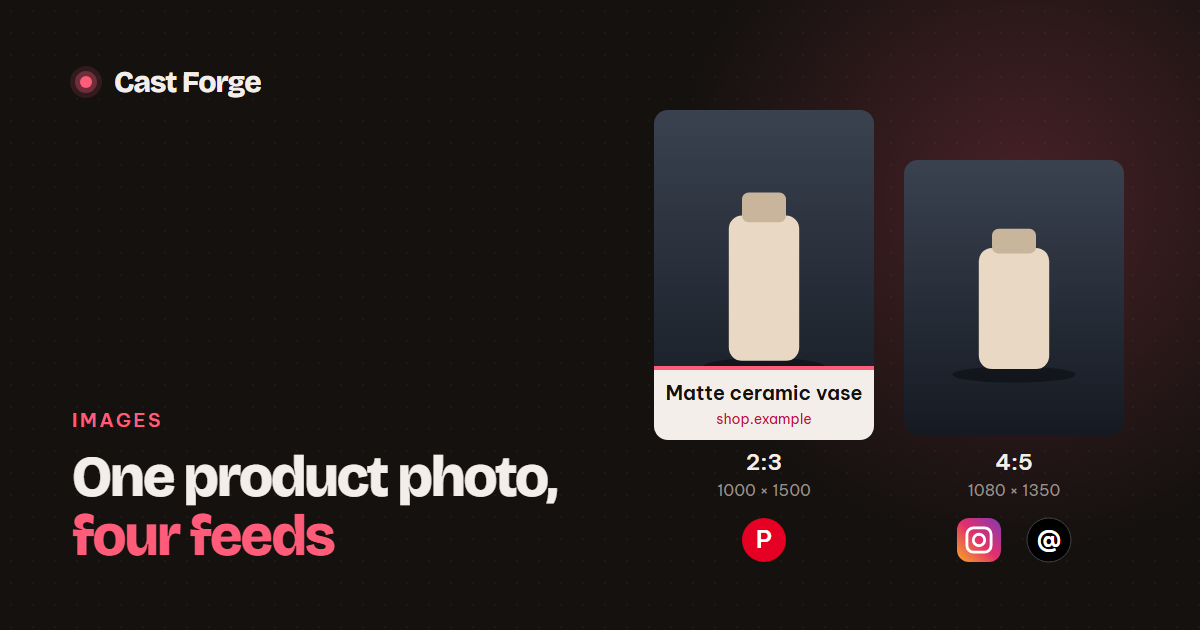
- Pinterest: 2:3, 1000 × 1500. Taller Pins may be cut off in the feed.
- Instagram API: JPEG only, aspect ratio 0.8 to 1.91 (4:5 portrait is the tallest). A 3:4 photo also fails.
- Threads: JPEG or PNG, ≤ 8 MB, 320–1440 px wide, up to 10:1.
- Start from a source photo whose short side is at least 600 px, or the result looks soft.
- Find the calm part of the photo for text automatically, instead of always using the same spot.
Every product Cast Forge publishes starts as one photo on a store page and ends up as posts on up to four networks. Each network wants a different shape, and the APIs are stricter than the apps: Instagram will happily show a 3:4 photo you post from your phone, then reject the same image through its API. Here is what each network accepts and how we render one photo for all of them.
The sizes each network accepts
| Network | We render | Accepted through the API | Format and size |
|---|---|---|---|
| 1000 × 1500 (2:3) | 2:3 recommended. Taller may be cut off in the feed | JPG or PNG, ≤ 20 MB | |
| 1080 × 1350 (4:5) | Width ÷ height between 0.8 (4:5) and 1.91 | JPEG only | |
| Threads | 1080 × 1350 (4:5) | Up to 10:1. Width 320–1440 px | JPEG or PNG, ≤ 8 MB, sRGB |
| Facebook Page | The 2:3 Pin image | Uploaded file as is | JPEG |
Two of these limits catch people out. First, Instagram’s range is about width ÷ height, so 2:3 (0.67) and 3:4 (0.75) are both too tall. Error code 36003 with subcode 2207009 tells you exactly that. Second, Threads downscales anything wider than 1440 px, so a larger file only costs upload time.
Why one file cannot serve every feed
You could post a square to every network and stop there, but you would give away space. A 2:3 Pin takes up more of the Pinterest grid than a square, and a 4:5 post is the tallest image Instagram shows in the feed. The tallest allowed shape is the one that earns the most attention on each network.
Rendering from the source photo
The mistake to avoid is cropping the finished Pin into a 4:5 post. The Pin has a headline baked in, and cropping it either cuts the text or the product. We keep the clean product photo next to every Pin and crop each format from that:
from PIL import Image, ImageOps, ImageFilter

def cover(img, w, h):
    # fill w×h, crop the overflow; centre slightly above middle where products sit
    return ImageOps.fit(img, (w, h), Image.LANCZOS, centering=(0.5, 0.45))

def feed_image(photo, pin=None, size=(1080, 1350)):
    if photo is not None:
        return cover(photo, *size)              # the clean photo, cropped to 4:5
    # no clean photo: show the whole Pin on a blurred copy of itself
    canvas = cover(pin, *size).filter(ImageFilter.GaussianBlur(40))
    pin = pin.copy(); pin.thumbnail(size)
    canvas.paste(pin, ((size[0] - pin.width) // 2, (size[1] - pin.height) // 2))
    return canvas
The vertical centring of 0.45 is a small detail with a visible effect. Product photos usually have the product slightly above the middle and empty floor or table below it, so cropping a little above centre keeps the product whole more often.
The blurred-background fallback covers Pins that only exist as finished images. Nothing is cropped away, and the blur fills the frame with the Pin’s own colours instead of black bars.
Keep the headline off the product
A headline on the image lifts click-through on Pinterest. A headline across the product kills it. We use two layouts:
- Band: the photo fills the top two-thirds (1000 × 1000) and the headline sits in its own coloured band below. Text and product never overlap.
- Overlay: the photo fills the whole Pin and the headline goes in the calmest third, darkened with a soft gradient so white text stays readable.
“Calmest” is measured, not guessed. We shrink the photo to 200 × 300, run an edge filter, and compare the average edge density of the top, middle and bottom thirds. The product is where the edges are, so the third with the fewest edges is free for text. When an AI art director suggests a zone, we keep its choice unless that third is clearly busier than the calmest one, which stops a confident model from putting text on the product.
Source resolution and file settings
- Minimum source size. A 1000 px wide Pin built from a 400 px photo is a 2.5× upscale and looks blurry. We skip any photo whose short side is under 600 px and move to the next photo on the page.
- Avoid thumbnails. Store themes often serve
photo-300x300.jpgnext tophoto.jpg. Strip the-WxHsuffix and try the original file first. - JPEG at quality 88–92. Above that the files grow quickly with no visible difference after the networks recompress them. Instagram requires JPEG anyway.
- sRGB. Threads converts other colour spaces, and some phone photos tagged Display P3 shift colour when converted. Convert once yourself, with control over the result.
Checklist
- Pinterest: 1000 × 1500 JPEG, headline in a band or the calmest third.
- Instagram and Threads: 1080 × 1350 JPEG cropped from the clean photo, no baked-in headline needed.
- Facebook: upload the Pin image directly.
- Reject source photos under 600 px on the short side. Prefer originals to thumbnails.
- Validate the aspect ratio before calling Instagram. It is cheaper than reading error 2207009.
Frequently asked questions
What is the best Pinterest pin size?
1000 × 1500 px, a 2:3 ratio. Pinterest recommends it, and pins taller than that may be cut off in the feed.
Why does Instagram reject my image through the API?
The API takes JPEG images with an aspect ratio between 4:5 (portrait) and 1.91:1 (landscape). A 2:3 pin or a 3:4 photo is outside that range and fails with error code 36003, subcode 2207009.
Can I reuse one image on every network?
Reuse the photo, not the file. Render a 2:3 version for Pinterest and a 4:5 version for Instagram and Threads, and place the headline where it does not cover the product.
Sources
Platform limits and specs were checked against these pages on October 26, 2026. They change; the linked docs are authoritative.