From product sitemap to social posts: a pipeline that keeps AI costs flat
Turn a store’s sitemap into scheduled social posts: crawl product pages, pick the right photo, reserve slots first, write AI copy hours before posting.
- Sitemaps list every product. Handle sitemap indexes, which nest, and filter URLs with include/exclude patterns.
- Strip “related products”, upsell and widget blocks before collecting images, or other products’ photos leak in.
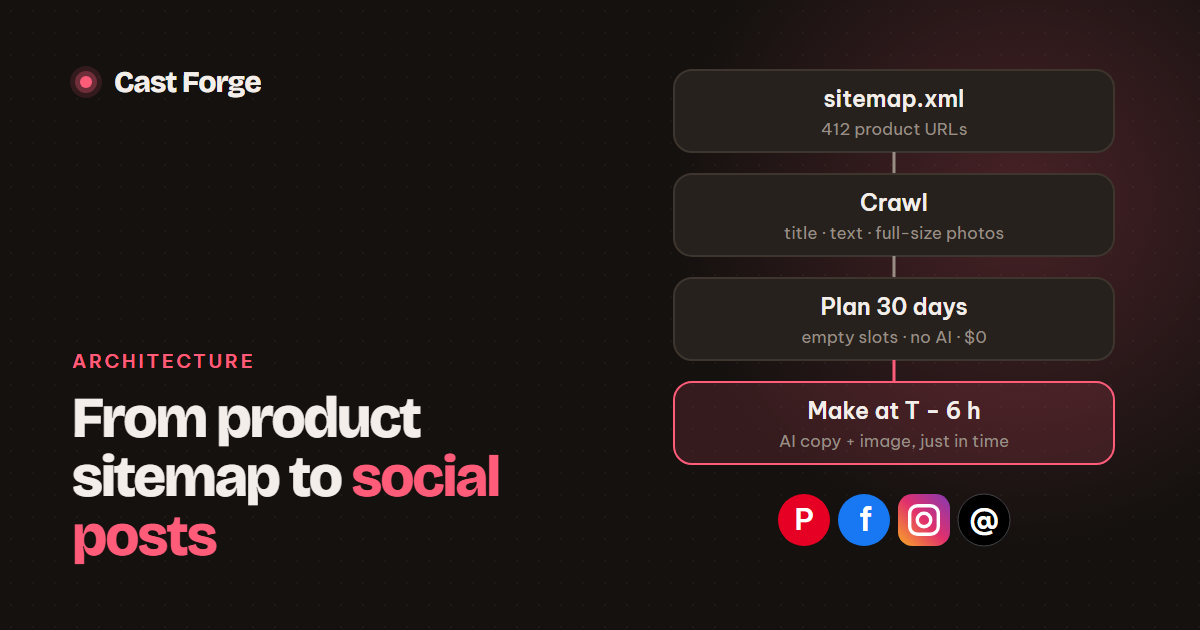
- Separate planning (cheap: page, account, time) from making (expensive: AI copy and images).
- Show the model the titles it already wrote for a product, so every post differs.
- Use structured output (a JSON schema) so copy can be stored and validated without parsing prose.
Cast Forge turns a store into a steady stream of posts with no manual input after setup. Most of the engineering is not the AI call itself. It is everything around it: finding the right pages, picking the right photo, and making sure every token spent ends up in a published post. This is the pipeline end to end.
Step 1: discover product URLs from the sitemap
A sitemap is the most complete list of a store’s pages, and every major platform generates one: WooCommerce through Yoast or the WordPress core sitemap, Shopify at /sitemap.xml. Large stores publish a sitemap index that points to child sitemaps (products, collections, posts), so read it recursively with a depth limit:
def sitemap_urls(url, depth=0):
    soup = BeautifulSoup(fetch(url).content, "xml")
    if soup.find("sitemapindex") and depth < 3:
        return [u for loc in soup.select("sitemap > loc")
                  for u in sitemap_urls(loc.text.strip(), depth + 1)]
    return [loc.text.strip() for loc in soup.select("url > loc")]
Then filter. An include pattern such as /products?/ keeps product pages, and an exclude pattern drops cart, account and tag pages. The homepage is skipped automatically. RSS or Atom is the fallback for blogs, where the newest entries are the ones worth posting.
Step 2: extract the right content from each page
Each page is fetched once, politely (half a second between requests, and only new URLs unless a refresh is asked for), and reduced to four fields:
- Title: the page’s
<h1>when present, elseog:title, else<title>. The H1 is usually the cleanest product name, without the “| Store name” suffix. - Description:
og:descriptionor the meta description. - Excerpt: up to 2,000 characters of paragraphs, list items and subheadings from the main content. This is the material the copywriter works from.
- Images: up to 12 full-size product photos.
Getting the photos right
Images are where naive crawlers go wrong. A product page shows plenty of photos of other products: related items, upsells, recently viewed and widgets. Take any of those and you post a photo of the wrong product with this product’s link. The extraction rules we arrived at:
- Work inside
<article>or<main>, and deletenav,header,footer,aside, forms, comments and every “related / upsell / cross-sell / recently viewed” block first. - Prefer the theme’s own gallery (for example
.woocommerce-product-gallery img) when it exists. Putog:imagefirst, since it is the image the merchant chose to represent the page. - Read the full-size URL from lazy-loading attributes (
data-large_image,data-orig-file,data-src, the largestsrcsetentry) beforesrc, which is often a placeholder. - Skip logos, icons, avatars, badges, SVGs, GIFs and anything declared narrower than 300 px.
- Collapse thumbnails into originals:
photo-300x300.jpgis dropped whenphoto.jpgis also listed.
Step 3: plan slots without spending anything
Planning decides what goes out where and when: a product, an account and a time. Nothing else is stored yet. Cast Forge plans 30 days ahead every night, applying the pacing rules from posting at a human pace, and each slot is a row with status planned.
Why not generate everything at planning time? Consider an illustrative store with 4 accounts at 10 posts a day, planned 30 days ahead: 1,200 slots. Over a month, a share of those slots never publish as planned. The merchant deletes a product, pauses an account, edits a schedule or changes the brand style. Every one of them would be AI copy and an AI image paid for and thrown away. And generating everything up front puts a month of AI spending on one day.
Step 4: make content just in time
A background worker looks for planned slots due within the next 6 hours (configurable) and fills them a few at a time: copy, art direction and the image. The slot becomes scheduled, and the merchant can still review, edit or redraw it before it goes out. If generation fails (a quota runs out, a photo is unreachable), the error is stored on the slot, it stays planned, and the next pass retries it.
Just-in-time generation also improves the copy. When a product is posted for the third time, the model sees the titles written the first two times and is asked for something different. The image avoids layouts already used for that product, and the next product photo in the gallery leads, so repeat posts do not look like duplicates.
Structured output, not prose
The copywriter returns JSON that matches a schema: title, description, headline (the short text on the image), alt_text and board, plus layout and text-zone choices when it also art-directs. All three providers we support (Anthropic, OpenAI and Gemini) offer schema-constrained output. That makes the result safe to store directly. We still validate it: a board the model invents is replaced with an allowed one, so a post never fails on a board that does not exist.
Step 5: close the loop with clicks
Publishing results flow back into planning. Analytics are pulled daily, and when the planner ranks candidate products, those whose earlier posts earned outbound clicks move up the queue, after products not yet posted on that account and those matching the merchant’s priority pattern. Over time the stream leans towards what the audience actually clicks.
Checklist
- Discover URLs from the sitemap. Follow sitemap indexes and filter with include/exclude patterns.
- Crawl politely and only new URLs. Strip related-product blocks before collecting images.
- Prefer full-size originals over thumbnails and lazy-load placeholders.
- Plan slots ahead with no AI. Generate copy and images a few hours before each slot.
- Keep failures retryable, and feed earlier titles and layouts into the next generation.
- Use schema-constrained output and validate it before storing.
Frequently asked questions
Should I use the sitemap or the RSS feed of a store?
The sitemap. It lists every product, not just the newest, and WooCommerce, Shopify and most CMSs publish one automatically. RSS is a good fallback for blogs, where only recent posts matter.
When should AI copy be generated for a scheduled post?
A few hours before it goes out. Generating a month ahead wastes money on posts that get deleted or moved, and the copy cannot take into account the posts published in between.
How do you stop the wrong product photo ending up on a post?
Remove ‘related products’, upsell and widget blocks from the page before collecting images, prefer the theme’s own product gallery, and drop thumbnails smaller than the output image.
Sources
Platform limits and specs were checked against these pages on October 26, 2026. They change; the linked docs are authoritative.